
Get your Bearer token from SSP.
Every client API request is authenticated with a Bearer token. You generate and manage that token inside your ConnectUs SSP account. The token also identifies your customer account, so you do not need to send a customer ID.
Where to get the token
Sign in to SSP
Open https://quote.connectuscorp.com/ and sign in to your customer account.
Open Account Settings
Use the account menu to open Account Settings.
Choose the environment
Under API Integrations, select Sandbox Token while developing or Production Token for a live integration.
Generate the token
Click Generate Token as marked 1 in the screenshot below.
Copy the token
Use the copy button marked 2. The token can also be viewed again later from this page.
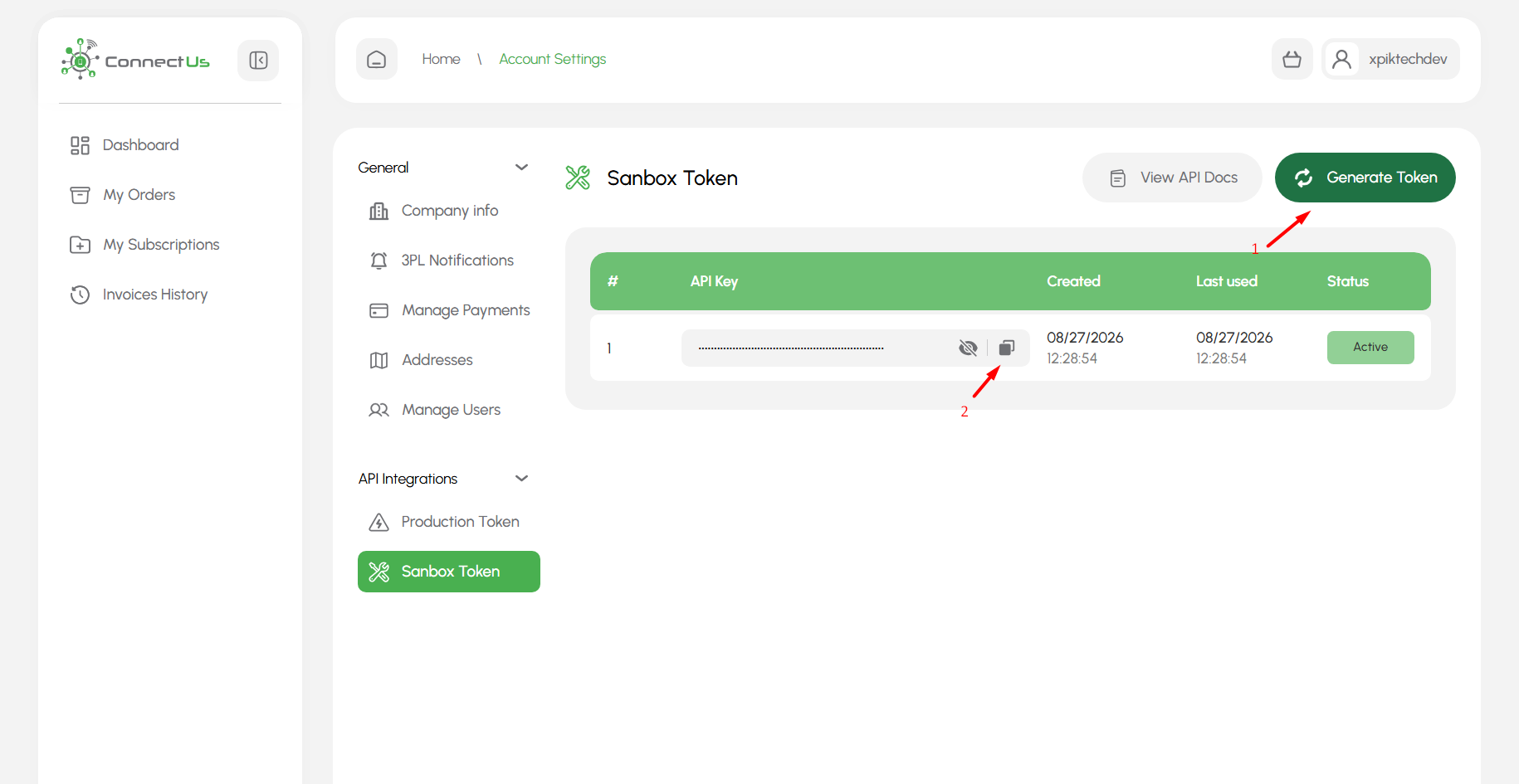
SSP → Account Settings → API Integrations → Sandbox Token / Production Token
Only one token can be active at a time. Generating a new token replaces the current token. Any integration still using the previous token will stop authenticating and must be updated with the new value.
Token behavior
No expiration
The token does not expire automatically. Rotate it when your security policy requires it.
One active token
Generating a new token replaces the previous active token.
View it later
You can return to SSP and view or copy the active token at any time.
How to use the token
Send it in the HTTP Authorization header on every request:
Authorization: Bearer YOUR_API_TOKEN
Accept: application/json
For example:
curl --request GET \
  --url "https://workspace-stage.connectuscorp.com/api/v2/client/projects" \
  --header "Accept: application/json" \
  --header "Authorization: Bearer YOUR_SANDBOX_TOKEN"
Do not add a customer ID to the URL, headers, or request body unless a specific field in the endpoint schema explicitly asks for one. The client API resolves your ConnectUs customer from the Bearer token.
Keep the token safe
- Store the token in a secret manager or protected environment variable, not in source control.
- Never expose it in client-side browser JavaScript or public logs.
- Use the Sandbox Token only with the sandbox API and the Production Token only with production.
- If a token may have been exposed, generate a new one and update your integration immediately.
If authentication fails
If you receive 401 Unauthorized, check these first:
Wrong environment
A Sandbox Token should be sent to https://workspace-stage.connectuscorp.com/api/v2, not the production base URL.
Token was replaced
If someone generated a new token in SSP, the old one is no longer active. Copy the current token from SSP.